Study Languages
Understand a Grammar Point
I am learning [TARGET_LANGUAGE] and I do not understand [GRAMMAR_POINT]. Please explain it in [NATIVE_LANGUAGE] at [LEVEL] level. Structure: 1. The rule in one or two si…

Google's AI assistant, built into the apps you already use
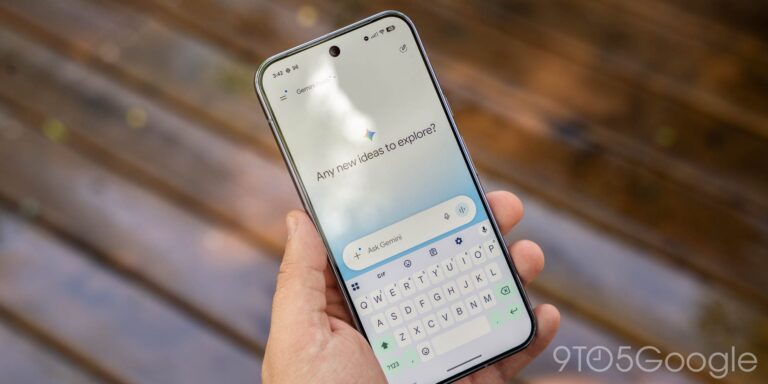
Gemini is Google's AI assistant. You can use it in its own app or website, and it also appears inside Google services such as Gmail, Docs and Android phones. It can answer questions, write and summarise, understand photos, and pull in information from Google Search. If you already live in the Google world, it can help with things like finding an email or drafting a document without switching apps. A free version is available, with paid upgrades for more.

Natural-sounding translations for text and documents
Translate text, whole documents and emails between dozens of languages, and polish your writing with DeepL Write.

A flexible workspace for notes, plans and teamwork, with AI
Keep notes, to-do lists, plans and documents in one place, with an AI assistant that writes and summarises for you.

A thoughtful AI assistant for writing, reading and analysis
An AI assistant from Anthropic that is good with long documents, careful writing and working through problems step by step.

Rephrase, summarise and check your writing in one place
Reword a sentence in different styles, summarise long texts and check grammar and citations.
Google is rolling out new privacy settings for the Gemini app that will let you “keep your history while independently controlling generative AI model training.”
Ahead of the Gems shutdown that starts rolling out tomorrow, Google is adding two key features to Gemini skills.
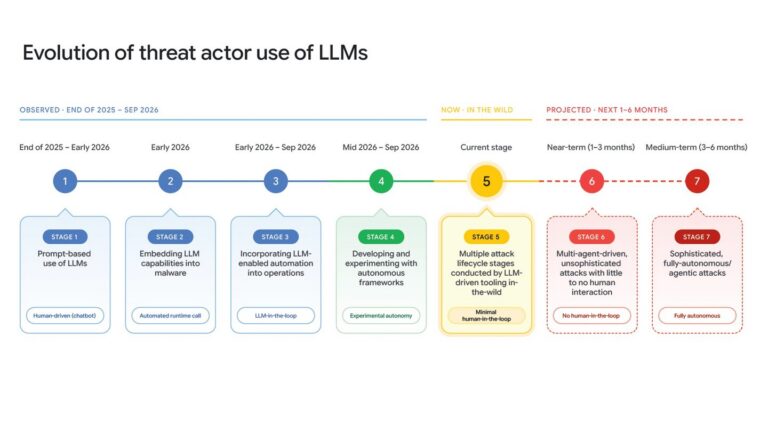
See how bad actors are shifting to autonomous attacks and how Google AI Threat Defense uses Gemini to defend against them.